Bird's Eye View
If you've never heard of Triggerbot before, or are just finding out about it for the very first time, you're on the right page. This will give you a high-level overview of the project. From here you can decide if this something you would be interested in.
Triggerbot is a multi-feature Windows app that is best known for playing trigger tunes in IMVU accurately, and for "cutting" new trigger tunes for the IMVU catalog. Let's take a look at the user interface, and discover its capabilities.
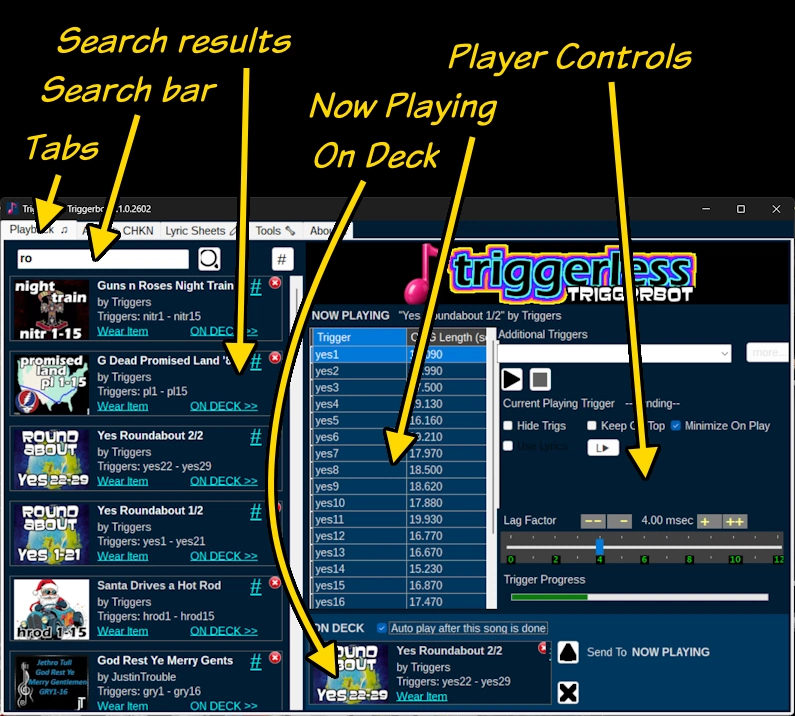
The main Window has a tabbed interface, and each tab page hosts a different activity. The tabs are as follows:
- Playback - This is the default tab, and the one that most users will be using. It has a simple yet powerful interface for playing trigger tunes in IMVU.
- Audio ▷ CHKN - This is where you can import MP3 files (and other formats) and convert them directly to CHKN files that you can submit to the catalog, assuming you have Creator status.
- Lyric Sheets - You can actually play the lyrics to a song in the IMVU chat window using a lyric sheet. You can copy and paste song lyrics and set the time you want each line in the song to play.
- Tools - This tab page has various tools that can be useful for troubleshooting problems, and initiate tasks to get around some of the hurdles to cooperation with the IMVU client.
- About - Your typical About box, with links to this web site and the Triggerless Discord server.
Requirements
In order to run Triggerbot, you'll need the following for your system:
- .NET Framework 4.7.2 or higher - Normally it's already installed with Windows, but if your version is earlier than Windows 8.1, you might have to install this manually.
- IMVU Classic client - We are not yet able to play sounds using IMVU Desktop, Next or Mobile. When this becomes a feature in the modern clients, we'll make this an option.
- 8 GB RAM or more - Most computers, even older ones, are able to run Triggerbot because its memory footprint is quite modest.