
Download v1.2
TL;DR: Search for song, wear it, send it to "On Deck", move it up to "Now Playing", click the Play button and enjoy!
The first step is to search for the song. You can type in any part of the song title, creator name, or trigger to find it. You can initiate the search by clicking the Search button or pressing the Enter key. There is also the option to search by hashtag, which we'll cover later.

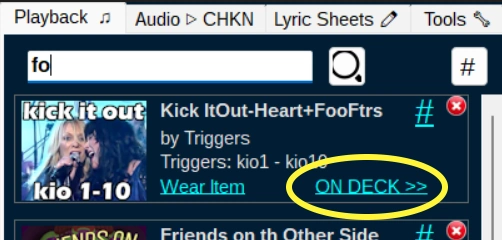
Once you find the song you want to play, you can click the "Wear Item" link to wear the product in IMVU. This is necessary (if you're not already wearing it) because the triggers won't cause any action if you're not wearing it. Remember "WEAR IT BEFORE YOU SHARE IT"!

After you wear the item, you can click the "On Deck" link to move it to the "On Deck" section. This is a staging area for songs that you want to play soon. The reason for On Deck is because some songs span two products, so you can queue up the second part behind the first part, and play one part after the other.

Notice the upward pointing arrow inside the "On Deck" area. This is the "Send To NOW PLAYING" button, and it moves the song up to the "Now Playing" section. This is where you put the song that you want to play right now. You'll notice that the grid fills up with the song triggers and their durations in seconds. This is the information that Triggerbot uses to play the song accurately.

Finally, you can click the Play button to start playing the song. Triggerbot will send the triggers to IMVU at the right times, and you'll hear the song playing in IMVU. You can also click the "Stop" button to stop playing the song at any time.
In the next section, we'll see how to do even more, including: