Once upon a time not very long ago, you had to be proficient at Audacity (or some other audio software tool) to be able to cut trigger tunes for IMVU. Then upon the arrival of Triggerbot, cutting new tunes for the catalog was now open to anybody who had Creator status. No longer were you required to manually cut your MP3 into OGG file pieces and assemble them together in IMVU Create Mode, a process which could take half an hour or longer. In mere seconds, Triggerbot was able to open any audio file and convert it straight to a CHKN file, ready to submit to the catalog. Thousands of trigger tunes have been created using Triggerbot, typically with high quality results!
Now it's your chance to harness this god-like superpower using Triggerbot. You can literally take a request and play it in a minute or two. I've cut new tunes while I was waiting in line to play.
To be fair, this is where the butter meets the bread. I've monetized Triggerbot so I'll earn 250 credits for every product cut using Triggerbot. IMVU is greedier, they take a cut of over 300 credits. But if you add a profit of your own and sell a few of them, you'll make back what you spent.
Instructions
Select the song to cut - If you don't already have the song you want, you can use MediaHuman YouTube downloader, Spotify, or any other way to download the song to your hard drive. Triggerbot can handle almost any file format, including MP3, AAC, WMA, FLAC and OGG to name a few.
(Optional) Prepare song for the cut - You may want to use Audacity to make some minor tweaks, like removing banter and cheering, adding Fade In and Fade Out, adding equalizer effects, etc. If you like the way song already sounds, you don't need to worry about this.
(Optional)
Adjust the overall volume - Many older songs were recorded at much lower levels than they are today. To compensate for that, there is a handy-dandy volume adjuster on the top right. But be a bit careful here, if too many of the waveform peaks go beyond the top and bottom borders, this is called "clipping", and that can make the sound very distorted, muddy and irrirating to listen to.
Choose Smart/Fixed Cut - Smart Cut is the default, and it choose where to cut based on where the song's amplitude (volume) is the lowest between 15 and 20 seconds, resulting in unequal segment lengths. Fixed Cut is the opposite, where all cuts are made at a specified segment length, and you choose this length from the dropdown to the right.
Choose the Sound Quality - Triggerbot will make an educated guess based on the length of the song. Songs less than 3:36 minutes default to HQ Stereo. Longer songs default to FM Stereo, which is not quite as crisp as HQ but still rather good with very few artifacts. Songs that are longer than 6:30 minutes will automatically be broken into more than one product to respect the 2MB limit imposed on all IMVU products.
Choose a Trigger Prefix - Trigger prefixes should contain only letters, no numbers, spaces or symbols. Since you won't have to type these in manually, you can be creative here.
Choose Female or Male Accessory - This only changes how the trigger tune product is categorized in the catalog. I use Male for male singers and Female for women, but this is arbitrary, do what you want.
(Optional) OGG Files and Product Icon - By default, Triggerbot deletes the OGG files it created after they've been loaded into the CHKN file, to save space on your hard drive. You can override this with the checkbox, but I wouldn't recommend it. By default Triggerbot will create 100x80 pixel PNG product icons for each CHKN file it creates. They are very basic, showing the song triggers for that product in an outlined Impact font on a transparent background. Some people like to add this as a layer to their own 100x80 image. These PNG files are tiny, but if you don't want them you can override this with the checkbox.
Click the blue Let's Start button - This starts the cut. Your audio file is decoded into raw WAV format, then chopped into pieces of length 20 seconds or less and encoded into OGG format. Triggerbot then creates the index.xml file that contains all the trigger information for the Actions. Then the XML, JSON and OGG files are compressed using Zip and renamed with the CHKN file extension for IMVU. The WAV and OGG files are deleted, then you can see the results.
(Optional) Show Me - This button will launch a File Explorer window in the folder where your CHKN and PNG files were saved. This is located in Documents\Triggerbot\{prefix}, where {prefix} is the trigger prefix you chose earlier. If there is another song with same prefix, a number will be appended to the directory so we don't overwrite the previous work.
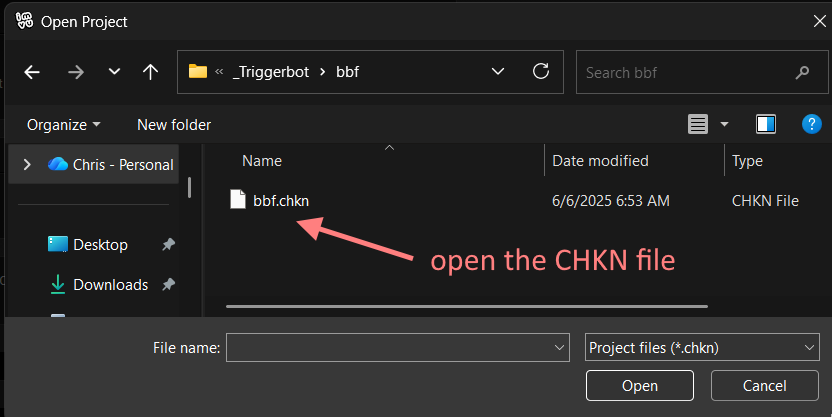
Load the CHKN project into IMVU Create Mode - Open the Create tab in IMVU and choose "Open a Local Project".
At the top of the open file dialog box, you'll see a folder shortcut named "_Triggerbot". Double click that one.
Then find the prefix folder and double click that one.
You should see your CHKN file there, so select that one.
If you'd like to double-check that it worked, open the Actions tab in Create Mode and test them out.
Now all you have to do is submit this to the catalog.
Submit to IMVU - Make sure you have your product icon ready. When you submit this, remember you only have 24 characters for the product name, so choose wisely. Also take advantage of the search terms so your product will be easy to find in the catalog later. Apply your icon and profit, and submit as usual. If you want to use this product right away, put it into Peer Review.
Update Triggerbot - Once you have submitted this to Peer Review, it's not actually in your local IMVU inventory yet. In IMVU, go to "Dress Up", then click the "Recently Added" icon. Your new product should show up as the first item. Now go back to Triggerbot, go to the Tools tab, and click "Scan New". Triggerbot will import your new product and you'll be able to search for it and wear it and play it right away.
(Mandatory) Now Make Another One! - Okay, I'm joking here, this is completely optional. Once you get the hang of this, I have to warn you, you might become addicted to cutting tunes this way! Have fun!
Future Plans
One of the features I plan to include in the future will be the ability to set manual cut points, in order to duplicate the way people use Audacity to make manually cut songs. But instead of having to save and assemble all the OGG pieces, Triggerbot will do that work for you. This will be a vast step forward for Trigger DJs who are meticulous about how their songs are cut exactly to their specifications.