Playback Pro Tips
Once you get the hang of playing tunes with Triggerbot, you'll eventually run into a problem. That's because Triggerbot can't read your mind LOL. There are various Gotchas to watch out for, and we'll cover those here. Here are the most common things that can go wrong.
- No Sound After Pressing Play - Here are the likely causes:
- You're not wearing the product. Check that first. Remember: "WEAR IT BEFORE YOU SHARE IT"
- The product you chose isn't actually in your inventory. This is a bug in IMVU, because when you try on a product without buying it, sometimes it gets stuck in the inventory erroneously.
- You own the product and are wearing it. Check your audio and make sure your speakers are connected, operational, and not muted. If you're in a room, ask the others if they can hear it. It's probably just you with the problem!
- Switching Tabs in IMVU - When you're playing a tune, stay on the page of the room you're playing in. Don't go checking your Inbox, Friends page, etc. The trigger just gets sent to IMVU, but it will only play if the tab for the room is selected.
- IMVU Popups - These usually happen when someone is trying to invite you to their room while you're playing where you already are. First of all, this truly disrespectful behavior, and stalkers can ruin the vibe. But when you get a popup while a trigger is about to fire, it doesn't make it to the room. But you can recover from this quickly.
- System Wide Popups - These are rare, and you can't really avoid these. Your computer is trying to tell you an important message, like your battery is almost out of charge. You can still recover from these.
- Typing While You Spin - I know that it seems that when Triggerbot is spinning for you, you can just chat like usual. It's not that simple. When Triggerbot is about to send another trigger, and there's some text you typed into the chat, it will try its best to cut what's there, send the trigger, then paste it back. In practice, that only works about 75% of the time. The other 25% of the time, the trigger gets messed up. To avoid this, only type short text, and time it so it shows up right after the trigger has been sent. But even here, you can still recover.
Recovering From Trigger Glitches
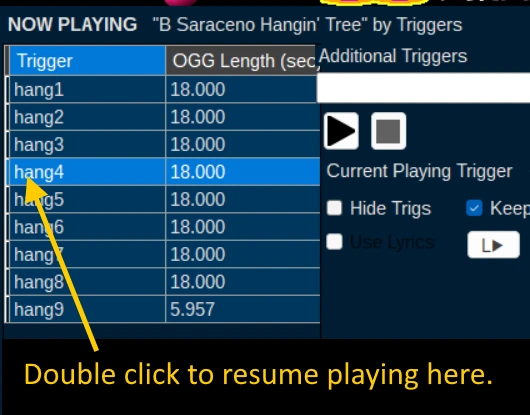
When you look at the Playback tab, you will notice the grid that displays the triggers and segment durations. This grid serves another purpose, to help you recover from a trigger glitch. When you double-click on a trigger in the grid, it will send that trigger to IMVU. So if you have a glitch, you can just double-click the trigger that should have played, and it will play again, and continue playing the rest of the song. This is a great way to recover from any of the above glitches.
Gaps, Overlaps, and Lag Control
When you play a tune, you want it to sound as good as possible. Some live DJs are dismissive of Trigger DJs because of the lags that occur when they trigger by manual typing, and rightly so. If there are gaps between the segments because a trigger fired too late, it can sound choppy. If there are overlaps because a trigger fired too early, it can sound muddy and distorted. Triggerbot has a built-in lag control that tries to compensate for any lag in the system, but it's not perfect.
The lag can be caused by various factors, such as the speed of your computer, the quality of your internet connection, the number of people in the room and how much they are wearing, and the load on IMVU's servers. The lag can also vary from one trigger to another, depending on how busy the system is at that moment. That's why it's recommended to adjust the lag control to find the sweet spot for your setup.
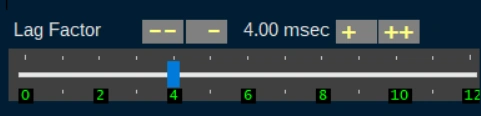
If you notice that your tunes are sounding choppy or muddy, you can adjust the lag control in the Playback tab. For gaps, you should decrease the lag factor value using the slider or buttons, so the trigger will fire slightly earlier. For overlaps, you should increase the lag factor value, causing the trigger to fire slightly later. Triggerbot ignores any "delag" sent by a trigger, and gives you full control over the lag compensation.
Other Playback Options

There are a few other options in the Playback tab that can help you customize your experience. They are:
- Hide Trigs - You can check this to hide the triggers from showing up in the chat. This can make conversation more enjoyable for both you and others in the room. It is also used to suppress the triggers while playing the tune with a lyric sheet. If you're trying to hide the fact that you're using Triggerbot, this option is NOT for you - it's a dead giveaway!
- Keep On Top - When this is enabled, Triggerbot will stay on top of other windows during Playback, so you can see it even when other windows are open. This can be helpful when you're preparing to play a trigger tune and you only have one monitor.
- Minimize On Play - When this is enabled, as soon as a song begins playing, Triggerbot will minimize itself to the taskbar. This allows you send triggers to IMVU without having to keep Triggerbot in the foreground. This is also helpful when you only have a single monitor.